
Top 5 Android Game Accessories to Level Up Your Mobile Play
The mobile gaming ecosystem has undergone a dramatic transformation. High-fidelity hardware chips, expanded cloud-streaming infrastructure, and highly optimized game engines allow Android devices to run graphically intensive titles that previously required a dedicated home console or a desktop computer. However, while the internal processing power of modern smartphones has accelerated, the external physical design of these devices remains restricted by structural requirements like thin profiles and flat glass surfaces.
Relying entirely on virtual touchscreen controls introduces a set of inherent performance bottlenecks. Touchscreen inputs block vital visual real estate on the screen, suffer from physical friction as hands warm up, and lack the mechanical tactility required for ultra-fast reaction times. Furthermore, prolonged operational loads place significant thermal and power strains on internal phone hardware. To transform a standard smartphone into an uncompromised pocket gaming console, selecting the right hardware accessories is essential. The following guide highlights the top five categories of Android gaming hardware designed to elevate your mobile play.
1. Direct-Connect Telescopic Controllers
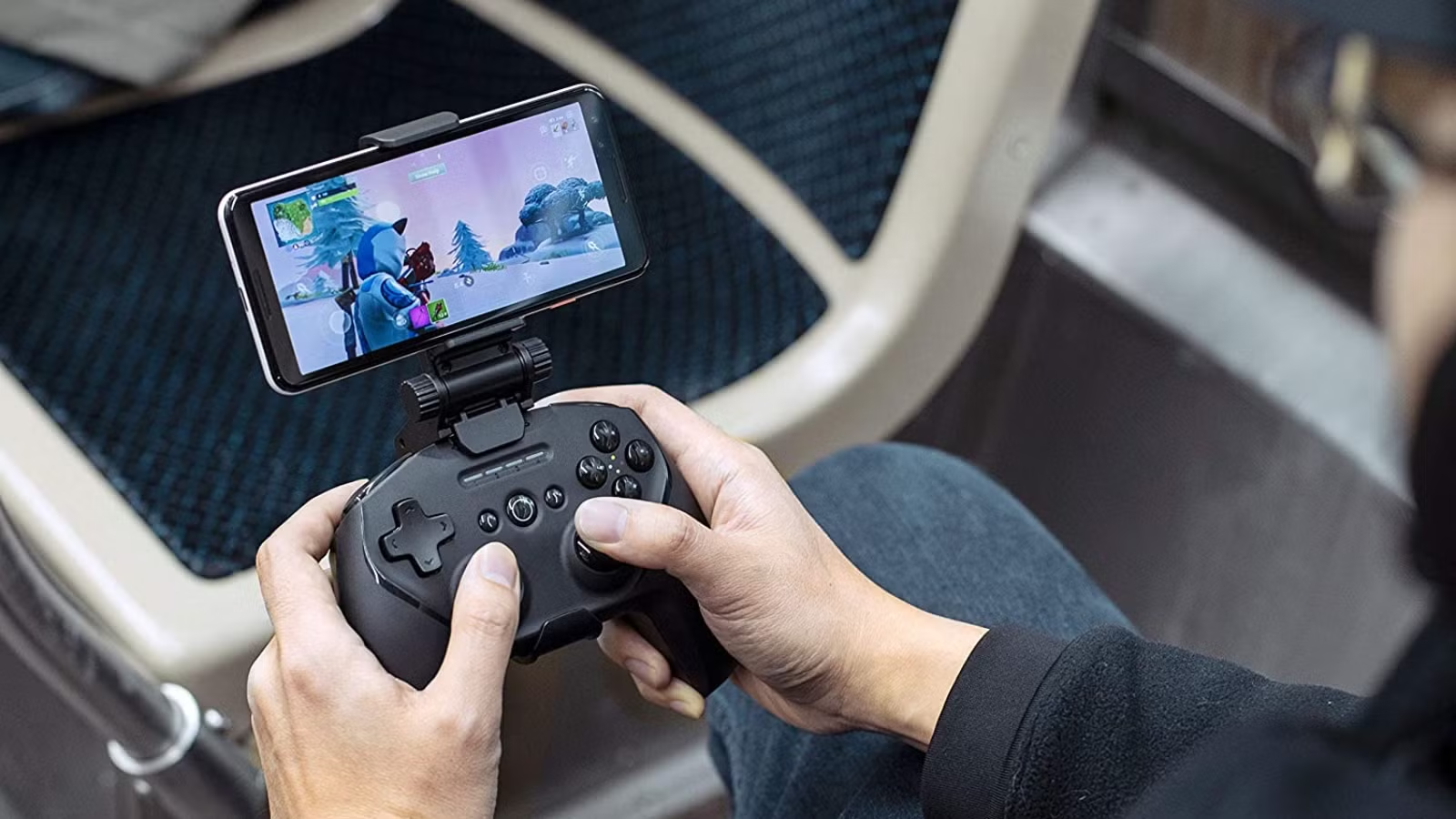
The single most impactful upgrade a mobile player can make is replacing virtual screen inputs with a dedicated physical controller. While standard wireless Bluetooth gamepads are functional, they introduce a noticeable input latency queue ranging from 80 to 150 milliseconds due to wireless packet translation. For high-stakes competitive ranked matches, this delay can be the difference between victory and elimination.
The USB-C Advantage
Modern professional-grade telescopic controllers attach directly to the lateral edges of your phone, using an adjustable frame that connects to the integrated USB-C port of your device. This physical connection bridges the input communication gap, reducing latency to near zero milliseconds by executing direct hardware human interface device polling.
-
Hall Effect Hardware Protection: Top-tier mobile controllers utilize Hall Effect electromagnetic sensors for their analog joysticks and triggers instead of legacy mechanical potentiometers. Because these magnetic sensors never physically rub together, they are structurally immune to the mechanical degradation known as stick drift, ensuring absolute accuracy over millions of continuous inputs.
-
System Form Factor Transformation: By securing your smartphone firmly in the middle, a telescopic controller matches the comfortable, ergonomic form factor of dedicated handheld systems, completely removing your thumbs from the glass surface to clear up your full field of view.
2. Active Semiconductor Cooling Fans
Flagship Android mobile processors are incredibly powerful, but they operate within thin glass and metal enclosures devoid of internal physical fans. When running demanding open-world games or advanced system emulators, the internal central processing unit generates intense heat. To prevent catastrophic hardware damage, the phone operating system automatically triggers thermal throttling, lowering processor clock speeds and causing severe in-game frame-rate drops and stuttering.
The Physics of Thermoelectric Cooling
Passive phone cases merely act as thermal insulators, keeping the heat trapped inside the chassis. Serious mobile sessions demand an active external cooling solution powered by a Thermoelectric Cooler (TEC) semiconductor plate.
-
Peltier Effect Manipulation: These clip-on or magnetic cooling accessories use electricity to create a dramatic temperature differential across an internal semiconductor plate. One side gets intensely cold, pulling raw heat directly out of the phone rear glass casing, while a high-velocity fan dissipates that thermal energy out of the opposite side.
-
Frame-Time Stabilization: By maintaining the core temperature of your phone hardware well below throttling thresholds, an active semiconductor fan keeps your in-game frame rates completely locked, ensuring smooth visual presentation during long, extended multiplayer sessions.
3. GaN Chargers with Charge Separation Support
Mobile gaming strains the battery cell faster than almost any other smartphone utility. While plugging your phone into a standard wall charger during gameplay solves the power drainage problem, it creates a massive secondary issue: charging a lithium-ion battery generates substantial internal heat on its own. Combining battery-charging heat with CPU-processing heat can severely degrade long-term battery health and degrade system performance.
Gallium Nitride Efficiency and Motherboard Bypass
The solution requires combining a modern Gallium Nitride (GaN) fast-charging adapter with a software feature known as Charge Separation or Bypass Charging.
-
Compact GaN Thermal Management: GaN chargers utilize advanced gallium nitride crystals instead of traditional silicon components. This material transfers electrical currents with vastly superior efficiency, generating significantly less heat while keeping the actual charging brick exceptionally compact and portable.
-
Direct Motherboard Power Delivery: When connected to a compatible Android device, a high-wattage GaN charger can route electrical currents directly to the system motherboard, completely bypassing the battery loop. Because the battery is neither charging nor discharging during this time, battery-generated heat is completely eliminated from the hardware equation, allowing your device to run cool and perform efficiently indefinitely.
4. Ultra-Low Latency Wireless Audio Earbuds
Sound is a vital source of real-time environmental data in multiplayer games. Hearing an opponent footstep or tracking the trajectory of distant gunfire can help you anticipate incoming threats. However, with the physical removal of the traditional 3.5mm headphone jack across most flagship Android devices, players have been forced to rely on standard consumer Bluetooth earbuds. Unfortunately, standard Bluetooth audio transmission introduces a lag of up to 200 milliseconds, causing audio cues to play noticeably after the corresponding action occurs on screen.
Dedicated Gaming Codecs and Dongles
To maintain full situational awareness without the clutter of a long wired cable, gaming-centric wireless earbuds utilize specialized low-latency connection modes.
-
Proprietary 2.4GHz Wireless USB-C Dongles: Premium mobile gaming earbuds include a compact USB-C transmitter that plugs directly into the bottom of your phone or pass-through controller port. This configuration completely avoids standard Bluetooth protocols, using a fast 2.4GHz wireless channel to drop audio latency down under 30 milliseconds.
-
Advanced Gaming Bluetooth Codecs: If operating strictly over Bluetooth, gaming earbuds utilize specific protocols like aptX Adaptive or dedicated low-latency gaming profiles. These modes dynamically compress the audio stream to prioritize transmission speed over raw bitrates, ensuring your audio cues remain in perfect synchronization with the real-time visual display.
5. Physical Screen Triggers and Conductive Thumb Sleeves
For mobile players who prefer to maintain the native form factor of their smartphone without attaching bulky telescopic controller cradles, a combination of mechanical clip-on triggers and conductive fabric thumb sleeves offers an exceptional budget-friendly solution.
Ergonomic Split-Input Mechanics
Mechanical gaming triggers clip directly onto the upper horizontal edge of your smartphone frame.
-
Four-Finger Claw Ergonomics: These physical attachments use a mechanical lever arm to convert a top bumper physical click into a direct capacitive press on the upper edge of your touchscreen. This design allows players to transition to a four-finger claw layout, using their index fingers to map aiming down sights or firing actions while keeping their thumbs free to manage directional movement and camera rotation.
-
Frictionless Conductive Sleeves: To optimize touchscreen tracking, serious players wear specialized finger sleeves woven from highly conductive silver fiber. These sleeves completely eliminate the variable surface friction caused by natural skin oils or sweat, ensuring the screen registers continuous, uniform touch responses without input dropping or accidental drag stutters.
Technical Performance Matrix of Peripherals
To maximize your performance gains, select accessories that explicitly resolve the specific hardware limitations of your typical play style.
| Accessory Category | Core Technical Problem Solved | Primary Competitive Advantage | Ideal Game Genres |
| Direct USB-C Controllers | Eliminates input latency and screen blocking | Tactile feedback, zero-drift analog joysticks | First-Person Shooters, Emulators, Cloud Gaming |
| Semiconductor Coolers | Prevents system thermal throttling | Completely stable long-term frame rates | Heavy Open-World RPGs, Graphical Benchmarks |
| GaN Power Adapters | Prevents battery overheating during play | Safe, unlimited continuous power delivery | Marathon Ranked Sessions, Competitive Play |
| Gaming Wireless Earbuds | Synchronizes real-time audio cues | Millisecond-accurate directional sound mapping | Tactical Battle Royales, Rhythm Audio Games |
| Conductive Thumb Sleeves | Eliminates screen moisture and touch drag | Perfectly uniform physical sliding response | High-APM MOBAs, Casual Arcade Shooters |
Frequently Asked Questions
Do direct-connect USB-C controllers drain the phone battery quickly?
Direct-connect controllers draw a minimal amount of operational current directly from your smartphone motherboard to power their internal chips and basic input polling mechanics, resulting in negligible battery drain. Furthermore, premium controllers feature integrated pass-through charging ports. This design allows you to plug an external power cable directly into the controller frame, charging your phone simultaneously while you play to prevent battery depletion.
Can a semiconductor cooler cause internal moisture damage due to condensation?
Condensation is a valid thermodynamic risk if an exceptionally powerful semiconductor cooling fan operates on a bare phone casing in a highly humid environment without the phone running an active game. Because the plate drops below ambient room temperature, moisture can form on the cold surface. To eliminate this risk, modern cooling accessories feature smart internal thermostats that dynamically adjust the cooling wattage based on the actual real-time heat output of the phone, ensuring the temperature never drops past the environmental dew point.
What is the mechanical difference between a standard analog joystick and a Hall Effect stick?
Standard joysticks utilize physical carbon resistive strips that rub against a mechanical wiper to read inputs. Over time, these material contacts inevitably wear down or collect micro-particles of dust, causing inaccurate sensor readings known as stick drift. Hall Effect joysticks replace these physical contact points entirely with a suspended permanent magnet and an ultra-precise electrical voltage sensor chip. Because the components never physically touch, the calibration remains pristine indefinitely.
Are clip-on mechanical triggers safe to use over tempered glass screen protectors?
Yes, high-quality mechanical triggers are specifically engineered with adjustable tension clamps or padded silicone cushions to accommodate varying phone depths. They are completely safe to attach over a standard tempered glass screen protector, provided the clamp is not forced past its intended thickness threshold. Ensure that the conductive rubber pads of the trigger make firm, flat contact with the glass surface to guarantee reliable capacitive input transfer.
Why do some Android games fail to recognize an external controller natively?
While the Android operating system features robust, native hardware controller support, individual game developers must intentionally code controller mapping profiles into their software titles. Some popular multiplayer titles restrict native controller inputs to maintain a level playing field against touchscreen purists. To circumvent this limitation, premium controller developers offer proprietary companion applications that allow users to map physical controller buttons directly to virtual on-screen touch coordinates.
How does a GaN charger manage to deliver higher wattages without getting hot?
Traditional chargers utilize silicon-based transistors, which possess a relatively low electrical bandgap, resulting in energy loss that dissipates as physical heat. Gallium Nitride possesses a much wider bandgap, meaning it can handle significantly higher electrical voltages and switch internal currents faster while losing minimal energy to resistance. This superior electrical efficiency allows components to be packed tightly together inside a smaller shell without causing localized thermal issues.